Basics of HTML
Basics of a loading a web-page
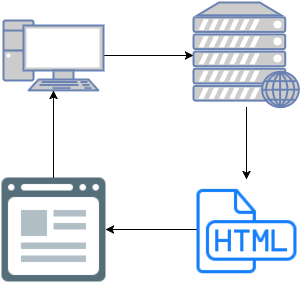
When you visit a website, there is a lot happening behind the scenes before the page you loaded shows up.
- Your browser, such as Chrome, Internet Explorer, Firefox, etc, makes a call to a domain (e.g. www.google.com)
- The server behind that domain finds the page's HTML contents and sends it back to the browser.
- The browser then displays that HTML.
What is HTML?
As mentioned above, HTML is what the browser needs to display a page. It has three major components that must be present in order for the web site to display properly:
- A "Doctype" to tell the browser what type of page this is.
- A "head" where all the information about the page goes.
- A "body" where the contents of the page go.
Here is an example of what an html file looks like:
<!DOCTYPE html>
<html>
<head>
    <meta charset="utf-8">
    <title>My Page</title>
</head>
<body>
    Hello World
</body>
</html>
Which will generate a page like this:

Not all that amazing yet, but that's where Bootstrap will come into play